Getting started
From signing up to your agent answering its first customer.
This walks you from a new account to your agent answering a real message. It takes about fifteen minutes, and you do not need a card: the Free plan includes a RM5.00 monthly usage allowance.
Step 1: Create your account
- Sign up with your business email at aibalas.com.
- Open the confirmation email and click the link. That link is the whole signup: there is no approval step and nobody has to let you in.
- You land in your workspace, on the Free plan.
Step 2: Workspace, agent: what the words mean
Your workspace is your business. It holds your billing, your team and your purchased top-up balance.
An agent is the thing that answers customers. One agent can hold one WhatsApp number, one Telegram connection and one website chat widget at the same time, and it answers on all of them from the same knowledge. You only need a second agent if you run a genuinely separate business line: a second WhatsApp number, say.
Step 3: Connect a channel
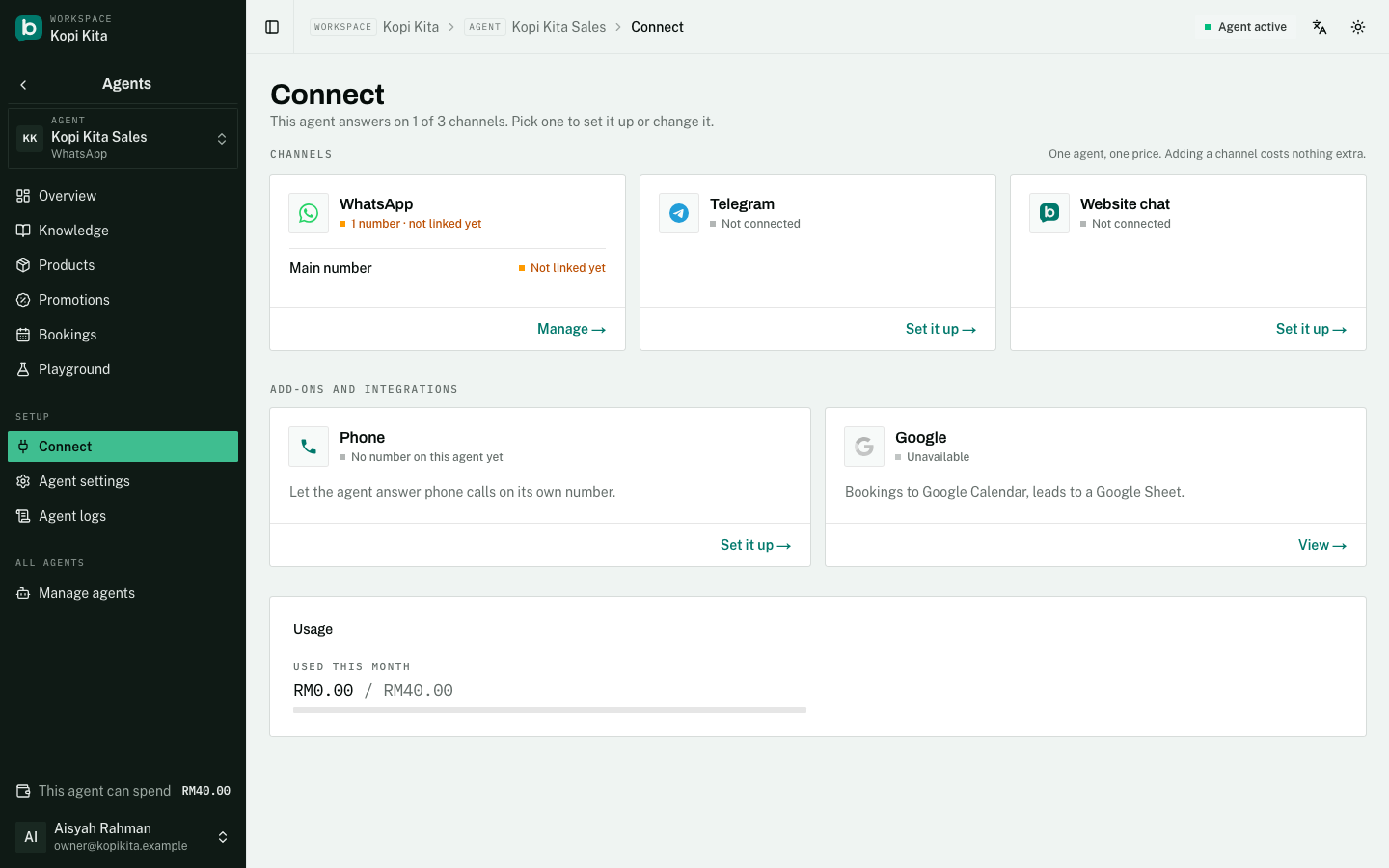
Open your agent and go to Connect. Pick whichever channel your customers already use:
- WhatsApp (QR link): scan a QR code with the WhatsApp number you already give customers, the same way WhatsApp Web works. About a minute, and you keep your number.
- Telegram: set one up with @BotFather in Telegram, then paste the token it gives you.
- Website chat: copy the snippet onto your site, and add your site's address to the allowed list. Until you add it, the widget serves nothing; that is deliberate, so nobody else can embed your agent.
- WhatsApp Cloud API: the official Meta connection, and you can set it up yourself. Pick "I use the WhatsApp Business app" on the Connect page, sign in to Meta in the window that opens, and scan one code with the app. Your phone keeps working and the agent answers alongside you. Included on the Agent plan (RM50 per agent per month).
Step 4: Tell it about your business
An agent with no knowledge will hand every conversation to you. Go to Knowledge and fill in the business facts form: opening hours, address, how to contact you, areas you cover, how customers pay, and your policies. That form alone is usually enough to start.
Below the form there is a free-text box for anything the form does not cover: your services, common questions, what you do and do not sell.
Step 5: Send it a real message
- Message your own number, Telegram handle or website widget from a different phone: not the phone you linked, since a message to yourself never arrives.
- Ask something your business facts answer, like your opening hours.
- You should get a reply within a few seconds.
The setup checklist
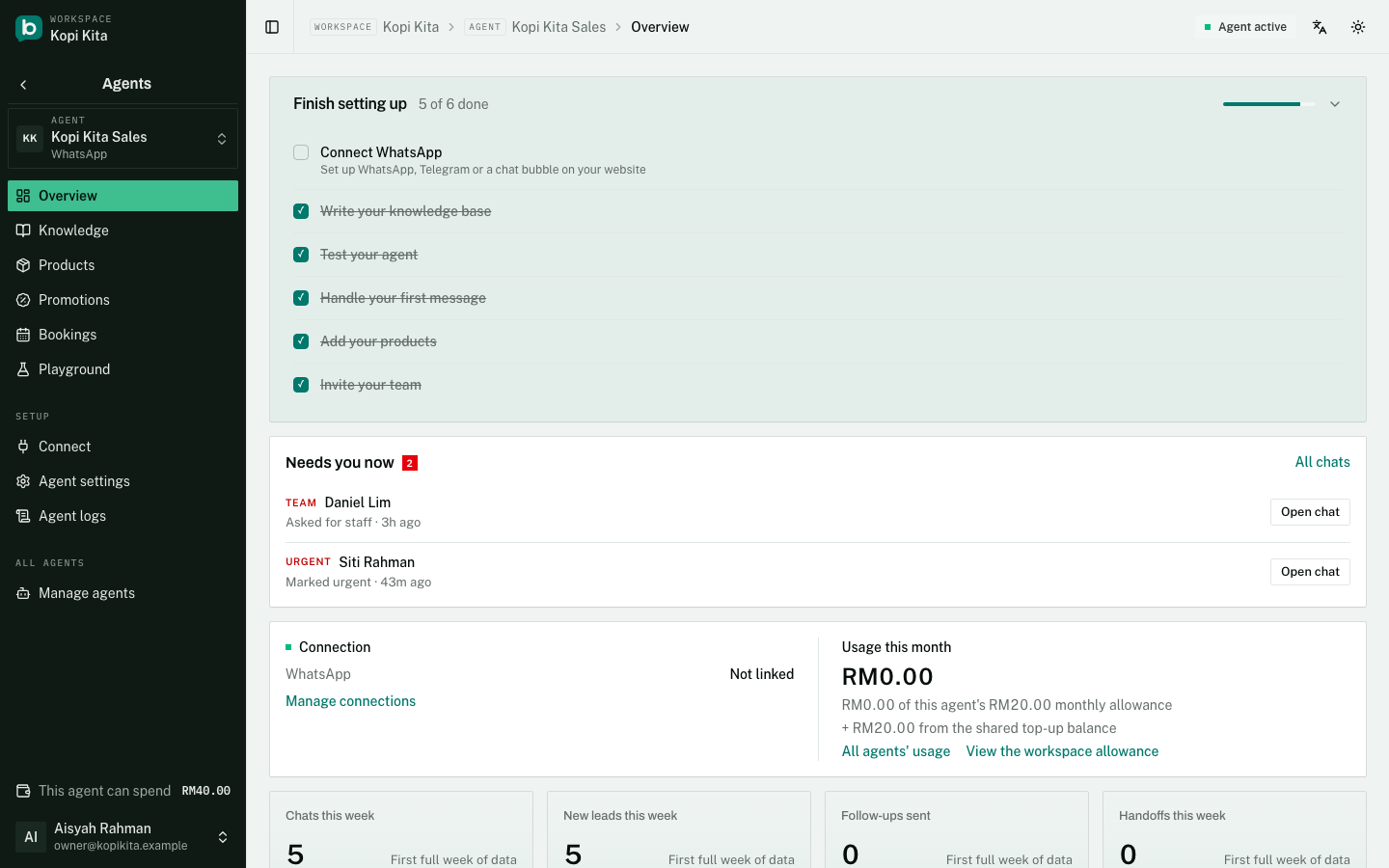
The agent's Overview opens with a checklist: connect a channel, write your knowledge, test the agent in the Playground, handle your first message, add products, invite your team. It ticks itself off as you go and disappears for good once everything is done. Below it, "Needs you now" lists the conversations waiting for a person.
Finding your way around
The sidebar has nine rows and they never change from page to page:
- Home, Chats and Contacts go straight to their page. Chats is every conversation across your agents; Contacts is everyone you have talked to, with a Leads view.
- Phone, Marketing, Agents, Reports and Settings open a list of their own pages. Click one and its pages replace the list, under a back arrow that takes you to the nine rows again.
- Library, between Agents and Reports, holds the knowledge, products and promotions your agents can share. It is for owners.
- Settings, at the bottom, holds General, Team, Billing, Referrals, Integrations, AI provider, Developers and Notifications.
Under Agents you pick one agent at a time from the list at the top, and its own pages follow: Overview, Knowledge, Products, Promotions, Bookings, Playground, then Connect, Agent settings and Agent logs. Links from an email or an alert open the right page with the sidebar already in the right place.
Where conversations show up
Chats shows every conversation across all your agents in one list; pick an agent's chip to see only its conversations. When the agent decides your team is needed, it says so to the customer and the conversation appears in Chats waiting for you.
What Free includes
- A RM5.00 monthly usage allowance, which resets at the start of each month.
- Unlimited contacts. Chats keep arriving even after the monthly allowance runs out; the AI stops replying but you can still answer by hand.
- WhatsApp by QR link, Telegram, and website chat.
- 20 Playground test messages a day, 150 a month. They are free on every plan.
- Products, product photos, reading photos and voice notes, voice replies, bookings, phone calls, templates and broadcasts, the online-store and Google integrations, and content marketing all need the Agent plan (RM50 per agent per month, a RM20.00 monthly allowance per agent). Follow-up messages need the Agent plan and a WhatsApp Cloud API connection: your agent never messages anyone first on a QR-linked number.
Still stuck?
Work through the common problems first. If none of them matches, contact us: we can see things you cannot.
Signed in? Open Help in your console to send us a ticket. Sign in