Channels
WhatsApp, Telegram and website chat: what each needs, and what each can and cannot do.
One agent can hold several WhatsApp numbers (up to 5), one Telegram connection and one website chat widget at the same time, at the same price, and it answers on all of them from the same knowledge. Customers who write to any of its numbers reach the same agent, and one person's messages across those numbers land in a single conversation. You only need a second agent for a genuinely separate business line: a different persona, or a different set of knowledge.
WhatsApp, by QR link
Scan one QR code from the phone that already has your number, the way WhatsApp Web works. You keep the number your customers already know, and you set it up yourself from the agent's Connect page in about a minute.
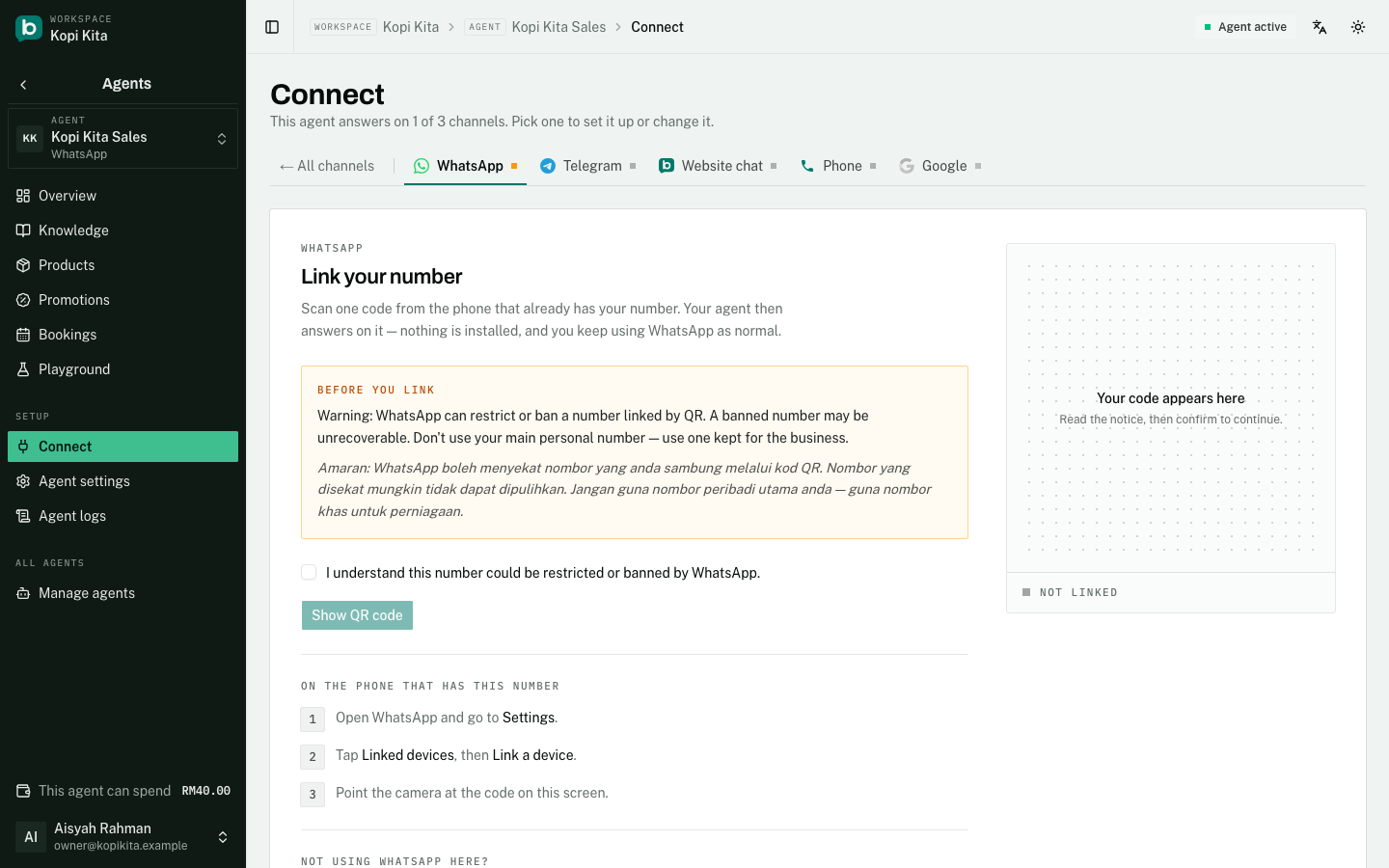
The link is a live session, so it can drop: if you log the device out from your phone, link the same number somewhere else, or leave the phone offline for a long stretch. Scan again from Connect. You lose no conversation history.
WhatsApp, by Cloud API
The official WhatsApp Business API, and you connect it yourself from the agent's Connect page: pick how the number is used today, and a Meta window opens where you sign in with the Facebook account that manages your business. It needs a paid plan (Agent, RM50 per agent per month). There are two ways in, and the choice matters:
- Keep using the WhatsApp Business app. For a number that is on your phone now. You scan one code with the app, the phone keeps working, and the agent answers alongside you. When you reply to a customer from the app yourself, the agent pauses for that person: 12 hours by default, which you can change in Settings. Meta also offers to bring across up to six months of past chats; they are stored so your agent has the context, never answered and never billed. Meta limits a number linked this way to 20 messages a second, which only matters for large broadcasts.
- Connect a number for the API only. For a fresh SIM, or a number you have taken off WhatsApp. It then lives on aiBalas only and cannot be used in any WhatsApp app until you disconnect it here.
A Cloud API number carries no ban risk, is the only kind that can message a customer first, and is what templates and broadcasts run on. The Connect page shows each number's health, and offers Reconnect if you ever disconnect it inside the app.
Adding another WhatsApp number
Each WhatsApp number on an agent is connected its own way: one by QR, another through Meta. Add one from the Connect page under "Add another number", up to 5 per agent, at no extra charge. Every message shows which number it came in on, and the agent replies on that same number.
Telegram
Set one up with @BotFather inside Telegram, then paste the token it gives you on the Connect page. Available on every plan we sell today, including Free.
Private chats only. Messages in Telegram groups and channels are ignored, so adding your agent to a group does nothing.
Website chat
A chat bubble on your own site, added with one line of HTML. Available on every plan we sell today.
You must also list your site's address under "Websites allowed to show this widget". With none listed the widget serves nothing: that is deliberate, and it is what stops anyone else embedding your agent on their own site.
What works where
Some things depend on which channel a customer used, not only on your plan. This is the part that catches people out:
- Reading incoming photos and voice notes: WhatsApp, by Cloud API or by QR, on the Agent plan. Telegram reads photos but not voice notes. Website chat reads text only.
- Messaging a customer first, including follow-up nudges, templates and broadcasts: WhatsApp by Cloud API only, on the Agent plan. Everywhere else your agent replies and never initiates.
- Sending photos out: any channel, on the Agent plan.
- Voice replies: WhatsApp and Telegram, on the Agent plan. Your agent speaks only when a customer sends a voice note it can read.
- Answering text: every channel, on every plan, including Free.
Disconnecting a channel
Disconnecting cannot be undone from that screen, and each channel loses something different:
- Telegram: the token is deleted, and only @BotFather can issue you another.
- Website chat: the key is replaced, so the snippet already pasted on your live site stops working and you must swap in the new one.
- WhatsApp by QR: reconnecting costs a fresh scan.
- WhatsApp by Cloud API: the number is released. One connected for the API only is also taken off the API, so you can put it back on a WhatsApp app. One connected with the WhatsApp Business app keeps working in the app; to stop sharing it with aiBalas completely, also open the app: Settings, Account, Business Platform, Disconnect.
Still stuck?
Work through the common problems first. If none of them matches, contact us: we can see things you cannot.
Signed in? Open Help in your console to send us a ticket. Sign in