Conversations
Chats, open and closed conversations, taking over from your agent, leads, contacts, and what your agent remembers.
Everything your customers say lands in one of two places, and knowing which is which saves a lot of hunting.
Chats
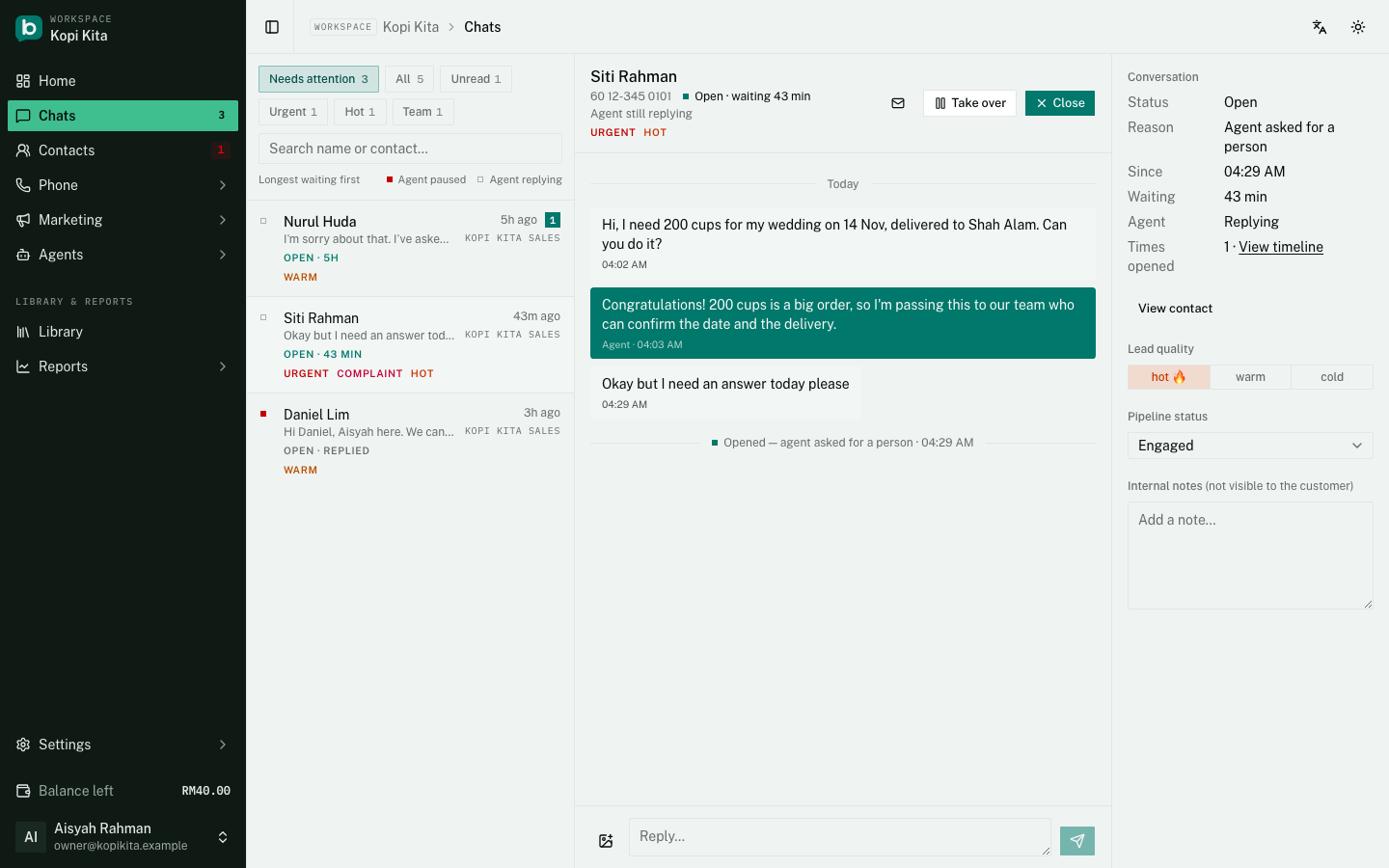
Chats is one view across every agent you run, in two panes: the list on the left, the conversation on the right, and you can reply without leaving it. It opens on "Needs attention", the conversations waiting for a person, longest wait first. "All" shows everything, and the Unread, Urgent, Hot and Team chips narrow either view (Team is the conversations a person has taken over). The number beside Chats in the sidebar is how many conversations are open right now.
Open and closed
A conversation is open when it needs a person. It opens when your agent hands it over, when the agent hits an error and cannot answer, when a customer replies to a broadcast you set to go to staff, or when you take it over yourself. A handoff opens a conversation even when your agent keeps answering, so it still lands in "Needs attention". The row shows how long it has waited, and "Replied" once someone on your team has answered. An agent simply answering a customer never opens one, and neither does a reply from the WhatsApp Business app, which pauses the agent but nothing else.
"Close" ends it. If the agent had been paused for that customer the button reads "Close & resume agent", and it hands the conversation back too. A conversation with no customer message for 7 days closes itself the same way, and the thread says so. Closing sends nothing to the customer and changes no alert or bill. In the conversation panel, "Times opened" counts how often a contact has needed you and links to their timeline.
Taking a conversation over
Reply to a customer yourself and your agent pauses for that person: the two of you will never answer at the same time. When you are finished, hand it back from the same page and the agent picks up again.
The same happens when you reply from the WhatsApp Business app, on a number you connected that way: the agent pauses for that customer, for 12 hours by default, and picks up again the next time they write after that. "Pause after you reply from the WhatsApp Business app" in Settings changes the length, and 0 makes it wait until you hand the conversation back yourself.
Leads
A lead carries two separate labels, and they do different jobs:
- Quality: hot, warm or cold. Your agent sets this from how the conversation went, and you can change it yourself on the chat page if it read the customer wrong.
- Stage: where the lead is in your sales path. Each agent sets its own stages in Agent settings > Pipeline stages. Out of the box they are New, Engaged, Quoted, Registered, Installed and Lost. Your agent moves someone to Engaged once they have written twice; the rest are yours to set as the deal moves.
Every stage has a type: Automatic, In progress, Won (customer) or Lost. New and Engaged are the Automatic ones. Won and Lost stages are the finished ones: once a lead is in one it stops counting as open, which is what keeps your open-leads number honest. In the default list Installed is Won and Lost is Lost, so Registered still counts as open. If you rename, add or reorder stages, give each one the right type and the numbers follow.
Leads are a view of Contacts, not a page of their own. Open Contacts and switch from Everyone to Leads to see everyone whose stage is not Won or Lost, across every agent you can reach, and narrow it to people who wrote in during the last 24 hours, 7 days or 30 days.
Categories
Your agent also files each conversation under a category, so you can see at a glance what people are writing in about. Out of the box those are New lead, Existing customer, Payment, Complaint and Unknown.
You can replace that list with your own in the agent's Settings: the categories that match how you actually think about your customers will be more useful than the ones we guessed.
Alongside the category your agent can flag a conversation as urgent. It may raise that flag, even on a conversation you have taken over, but it never lowers it: only a person clears it.
Contacts
A contact is one person across your whole workspace: display name, email, company, address, tags and notes. If you run several agents and the same customer messages two of them, it is still one contact.
What stays with the individual agent is the conversation itself: the stage, the quality, who it is assigned to, and whether the agent is currently paused for that person. Those describe a relationship with one number, not with the business.
You can import contacts from a CSV file on the Contacts page, and export them the same way. Imported contacts are never messaged automatically: your agent only ever replies to people who write in.
How many replies one person can get
An agent answers each contact up to a set number of times in 24 hours, then sends one notice and waits for the day to roll over. It is there so one person cannot spend your whole allowance in an afternoon. The default is generous for a real customer; "Automated replies per contact per day" in Settings raises it, and 0 removes it.
When a customer edits a message
On a QR-linked WhatsApp number and on Telegram, a message the customer edits is corrected in the conversation, so your agent replies to what they meant. The original is kept underneath. The Cloud API does not pass edits on.
What your agent remembers
Your agent keeps a short memory of each customer so a returning one does not have to start again. It is on already: the switch is "Contact memory extraction" in the agent's Settings.
It remembers four things, the language they write in, the products they asked about, any concerns they raised, and what you last talked about, plus a few lines summarising the relationship. All of it is on the contact's page, and you can correct anything that looks wrong.
It also fills in email, company and address on the contact when a customer mentions them. On a workspace with several agents that is shared: what one agent learns about a person, the others show too.
Still stuck?
Work through the common problems first. If none of them matches, contact us: we can see things you cannot.
Signed in? Open Help in your console to send us a ticket. Sign in